


Update: added new Fantasia codes on July 24, 2026
The ballroom lights dim. You hold a code in chat, thinking it’s a small thing — and then the avatar you wear tonight is suddenly worth a rumor. I’ve chased these drops across servers so you don’t have to; let me show you which ones matter right now.
I speak from the trenches of Roblox feeds and Discord channels, and you’ll find my advice practical and quick. I’ll point out the new rewards, show you how to redeem them fast, and explain why some codes stubbornly refuse to work. Read this as if you’re scanning a guest list before the doors open.
Every lobby chat mentions new codes before updates — here’s what just dropped
Small teams post big gifts, and they land faster than you expect.
I treat a valid code as a small victory; a code is a gilded map hidden in plain sight. Redeem the right one and you don’t just get items, you steer how other players will notice you.
- REVAMP: 1 Outfit Slot and 5000 Coins NEW
- secretf1t: 1 Outfit Slot
- b1bby: 1 Bibby Keepsake
How do I redeem codes in Fantasia?
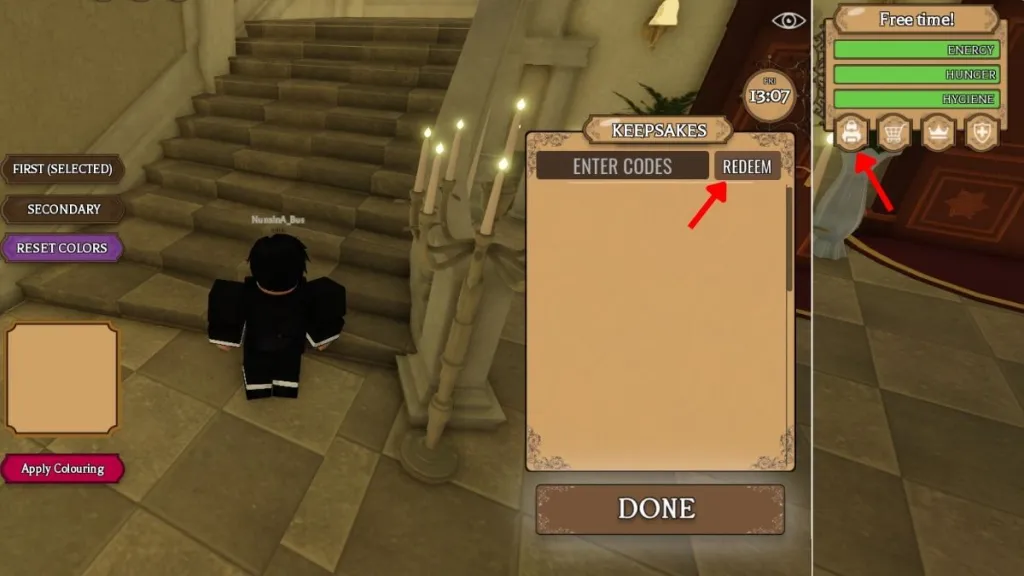
Open the game on Roblox, join any active server, then tap the Backpack icon on the right. Enter the code into the text box and hit Redeem. If it accepts, the reward pops straight into your inventory.
I watch code lists daily — expired tags are quieter but still tell a story
Expired codes don’t always vanish at once; sometimes they fade after an event finishes.
As of this July 24, 2026 update, there are no expired Fantasia codes on the list — which means the active ones above are worth claiming now. I recommend redeeming immediately because free outfit slots and thousands of coins get claimed fast during server surges.
Every tutorial video shows the same screen sequence — these are the exact steps that work
People new to Fantasia often get tripped up by one tiny button.
- Launch Fantasia on Roblox.
- Join a server or click Play, then open the Backpack icon on the right side of the HUD.
- Type an active code into the box labeled for codes.
- Press Redeem and watch your inventory update.
Where can I find new Fantasia codes?
Join the official Fantasia Discord server and the Sheki Studio community — those are primary sources. I also watch developer posts and the Roblox game page; Sheki Studio posts drops and event notes there.
I check Discord channels and dev posts first — here’s the fastest route to fresh codes
Developers drop codes in announcements, and players paste them into chat seconds later.
If you want steady updates, bookmark this page or follow the Fantasia Discord. Tools that help: Roblox notifications, Discord threads, and the Sheki Studio Twitter/X feed for real-time alerts. Treat those channels as your noticeboard; they tell you when events push new rewards.
I’ve tested broken codes so you don’t have to — most errors are tiny and fixable
Players often assume a code is dead when the issue is actually a typo or the wrong server.
Try these checks in order: retype the code exactly (case matters), join any active server instead of an older join link, and confirm the code isn’t expired. If the code still fails, the developers may have pulled it or the reward has reached a cap.
Why aren’t my Fantasia codes working?
Common culprits include incorrect capitalization, extra spaces, or redeeming on an old server instance. You can also check the Fantasia Discord announcement channel — developers sometimes restrict codes to certain events or time windows.
Every reward changes how you play: a single outfit slot can be the thread that completes your avatar’s identity; redeem fast and you control the room. I’ll keep this page refreshed after each drop and watch the channels so you don’t miss the next one — which code are you claiming first?
Support our work ❤️
If you enjoyed this article, consider leaving a tip to help us keep publishing great content.
